
The modern workplace is caught in a fascinating tug-of-war between distraction-free focus and absolute data capture. Hardware brands are forced to pick a side. In the audio space, tools like the Insta360 Mic Pro lean heavily into personalized expression and crisp capture, using e-ink screens to turn a physical microphone into a wearable creative statement. However, in the note-taking space, a sharp philosophical divide has emerged.
While market leaders like reMarkable pitch their e-paper tablets as purely analog, distraction-free sanctuaries that intentionally reject automated tools, an upstart challenger called Cuneflow is launching a direct counteroffensive. Debuting on Kickstarter, this namesake e-paper writing slate embraces the digital age by packing an integrated voice recorder engineered to transcribe entire conversations and extract automated AI insights from your business meetings.
Premium Construction Meets Unpolished Software
Physically, the Cuneflow establishes an incredibly premium first impression, though the software reveals a young company still finding its footing.
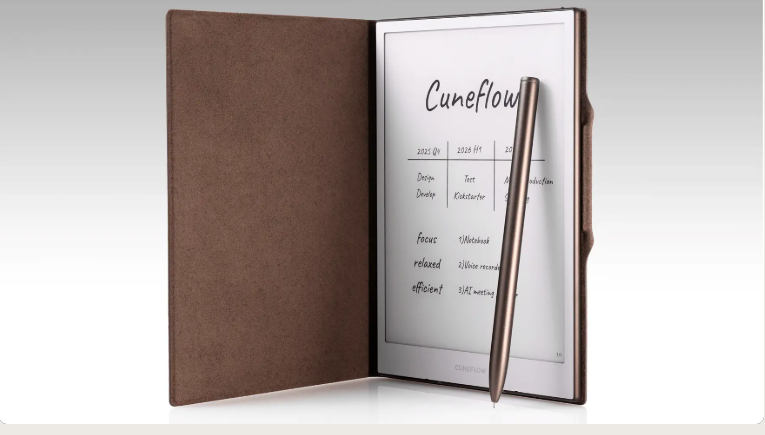
- The Core Display: The device features an A5-sized footprint built around an 8.2-inch E Ink Carta 1000 screen boasting a sharp 1,920 x 1,440 resolution. A 24-level adjustable frontlight makes it usable in dim boardrooms or late-night flights.
- Under the Hood: It runs on a 2 GHz dual-core ARM processor backed by 4 GB of RAM, 128GB of internal storage, and a 2,450 mAh battery rated for roughly 7 to 8 hours of continuous, active use.
- The Hardware Feel: Weighing in at 230 grams (8.1 oz), the aluminum unibody enclosure feels heftier and significantly sturdier than a standard Kindle. Coupled with a fingerprint-scanning power button and a brown faux-leather folio, the device looks and feels undeniably classy.
The writing experience is highly responsive and completely free of jarring mid-paragraph display refreshes, but it won’t make you forget you are writing on a digital screen. It utilizes a thin, scratchy passive Wacom EMR stylus that snaps magnetically to the side.
Unfortunately, the operating system feels unpolished. The persistent writing menu offers only a pen and a fussy highlighter that obscures your handwriting even on its lowest setting. Adjusting brush weights requires diving into a clunky drop-down bezel menu, falling short of the refined, seamless interface found on seasoned alternatives like the Kindle Scribe.
AI-Driven Meetings and the Security Compromise
The core selling point of the Cuneflow is its ability to offload the mental tax of minute-taking. Tapping the dedicated microphone icon in any notebook engages recording mode, indicated by a flashing red LED near the USB port.

To accommodate corporate security protocols, the audio is encrypted and piped to the cloud—utilizing backend models from OpenAI and Gemini, but it is never permanently stored. The moment the text populates your screen, the raw audio file is completely erased, leaving only the text transcript behind. Within a few minutes, the interface populates an Insights tab featuring the following:
- An executive summary and a chronological timeline.
- Automated to-do lists with individual checkboxes.
- Granular breakdowns tracking group disagreements, key questions, and potential project risks.
While the transcription engine is largely reliable, it is not infallible. It can struggle with complex terminology or specific proper nouns, occasionally swapping similar-sounding words (like transcribing “Phoenix Corporation” as “Felix Corporation”). Furthermore, because the raw audio is destroyed immediately for privacy reasons, high-stakes users or journalists lack an audio backup to verify disputed quotes later.
A Disconnect in Ecosystem Design
The primary hurdle holding the Cuneflow back is a stark lack of unified software integration across its features.
For instance, while the AI successfully generates a structured action-item list with checkboxes on the screen, users cannot actually tap or cross those boxes off with a finger or stylus. There is also no native method to drag text out of a transcript and drop it into a notebook for sketching or manual editing.
This compartmentalization extends to Cunespace, the company’s companion web interface. While you can view your meeting files online, you cannot interact with the text or check off tasks, forcing you to manually copy and paste text blocks into external documents like Microsoft Word or Notion to actually work with them.
Even basic hardware versatility faces roadblocks. While the slate supports Bluetooth keyboard pairing, typing requires opening a rigid on-screen text box that fails to expand automatically as you type, forcing you to manually drag the corner handles to fit your paragraphs. Combined with a lack of landscape display orientation, typing remains a deeply clumsy workflow.
Availability and Market Positioning
The Cuneflow attempts to merge two conflicting ideas: the focused, isolated nature of an e-paper slate and the automated, hyper-connected nature of cloud-based AI. Right now, those two worlds remain somewhat segregated within the device.
Cuneflow has not yet announced a definitive retail price tag, though the company states it will launch on Kickstarter “within the average market range” for premium e-paper tablets, offering standard early-bird discounts for its initial wave of crowd-funded backers.
